Remote support services offer faster, cheaper, more secure, and flexible options than physically present information technology (IT) teams. Remote IT support is now a standard practice due to the shift toward remote and hybrid work models. This shift has reduced the need for on-site support teams, making it impractical and inefficient in many cases.
Remote IT support services solve inefficiency challenges by replacing reactive resource-heavy solutions with proactive, scalable, cost-effective models. Knowing what remote IT support is, how remote support works, remote IT vs on-site IT, and how remote support services are used will help you choose the best option for your business.
What Is Remote IT Support?
Remote information technology (IT) support is an approach in which IT technicians diagnose and troubleshoot technical problems from another location using internet-based software with human support. There are a plethora of ways businesses use remote IT support services, including:
- User Access and Device Management: Remote support helps clients with password resets, account setups, new device configurations, and onboarding for new employees.
- Software Updates and Application Support: Remote support is used to fix crashes, implement updates, install programs, and resolve compatibility challenges.
- Troubleshoot Issues from a Remote Help Desk: Remote support teams view and control clients’ computers, fixing problems in real time.
- Security Upkeep: Remote IT support teams help clients with patching systems, antivirus monitoring systems, and basic incident response.
- Connectivity Technical Support: IT technicians troubleshoot connectivity tools, including email, VPN, WiFi, and Zoom.
Remote IT support is the most streamlined, strategic, and proactive model to follow for nearly every challenge aside from the few problems that require a physical presence. Enterprises interested in top-tier, reliable remote support benefit from security upkeep, application support, device management, and quality troubleshooting. Look for a remote IT managed service provider that is professional, offers strategic, personalized support, and has expertise in your industry.
How Remote IT Support Services Work
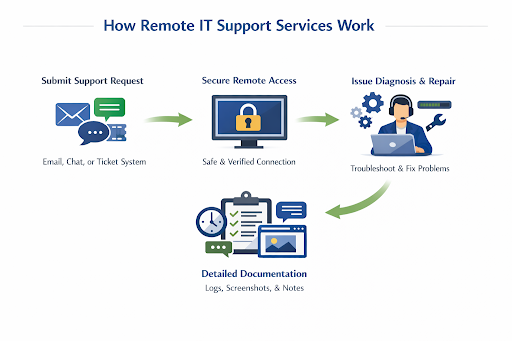
Clients who need IT support will go through a simple process to receive remote assistance, including intake, securing access, and documentation.
- The client submits a support request. This could be done through email, chat, or a ticketing system. Support requests are automatically logged and assigned to the most appropriate technical support person.
- The IT technician contacts the client and gains remote access through a secure, authenticated connection. Clients must allow screen sharing for full access help, but sessions are under continuous monitoring to ensure safety and correct verification.
- The technician works to resolve technical issues. They view, control, and troubleshoot the problems, run diagnostics, run software updates, adjust settings, transfer files, and more.
- All necessary documentation is written up by the technician or an automated program. Details such as timestamps, actions taken, screenshots, and chat logs are connected to the original support request. This helps to reduce follow-up calls and aids in audit compliance.
Remote IT Support vs On-Site Support
Remote IT support and on-site IT support teams offer unique advantages.
On-site IT teams give you access to technicians who provide direct hands-on assistance and can be trained specifically to your company’s requirements. Complex hardware fixes or software issues that require hands-on help benefit from this support model.
In contrast, remote support teams are ideal for software fixes, routine maintenance, cybersecurity solutions, and 24/7 monitoring.
Benefits of Remote IT Support
- Fast Response Time: Breaches, threats, and other issues are handled quickly with remote technical support. Remote assistance allows technicians to provide support to clients while diagnosing and fixing issues in real time without the need for on-site meetings.
- Cost-Effective: Remote support solutions are a cost-effective option for enterprises without the budget for an on-site team. Reducing operational costs, lowering IT staffing, minimizing downtime, and offering scalable pricing are all ways in which remote IT support lowers costs.
- Accessibility & Flexibility: Remote support is a great fit for businesses that are in remote or multiple locations, as they will be able to access round-the-clock support and help with technical issues from anywhere. IT providers are flexible to fit your business depending on your challenges, wants, price range, and technology needs.
- Reduced Downtime: Downtime reduces revenue and productivity, damages customer trust, and disrupts normal workflow for businesses. Remote IT service providers fix this issue by quickly troubleshooting and resolving issues through remote access. This ensures a client’s workflow continues smoothly and minimizes losses.
- 24/7 Monitoring & Proactive support: Remote support teams monitor 24/7 for data breaches, cyber threats, and other potential security threats. Our article on the benefits of managed security services goes into greater detail about the impact of these essential services on your business.
Benefits of the On-Site Support Model
- Personal Touch: On-site support teams offer more personalized assistance when meeting in person.
- Custom Training: An on-site support technician receives direct guidance that matches your company’s specific needs or wants.
- Seamless Communication: An on-site support process allows for seamless communication from client to technician, as face-to-face interaction tends to reduce misunderstandings.
FAQs
What type of business benefits the most from remote IT support?
Companies with complex systems that require scalable IT infrastructure, businesses operating across multiple offices or regions, regulated or compliance-driven companies, customer-facing enterprises, and operations-intensive enterprises all benefit from high-quality remote IT support services.
What is the cost for remote IT support for medium to large businesses?
Per-user pricing (on average) ranges from $100-$250 per user/month. Flat-rate pricing varies from $3,000-$10,000 per month. Enterprise-level pricing typically starts at $10,000 per month. This price covers complex business needs, multiple locations, and advanced compliance solutions.
Over the past 10 years, data breaches have become one of the most costly problems to enterprises, resulting in the need for 24/7 threat detection and fast incident response. Medium-to-large-sized businesses appreciate the scalable, cost-effective advantages of using remote IT support.
Remote IT Support Is a Positive Choice for Businesses
Remote IT support teams remotely monitor, fix, and document technical issues for your company. It is a convenient and cost-effective option. On-site IT support offers a personal touch and customizable training, but is not always cost-effective.
Remote access tools are safe, seamless, and accessible, guided by professional IT technicians. Enterprises looking to scale their business operations choose high-quality remote IT support services to safeguard their data, quickly find, assess, and fix issues, and reduce expenses for their overall IT budget.